
You passed the written exam with flying colors. You scored high marks in Math and English. But on the final day, you failed. Why? Because you couldn’t type 35 words per minute (WPM). This is the sad reality of thousands of aspirants appearing for SSC CHSL, CGL, RRB NTPC, and High Court exams.
In 2026, typing is no longer an “optional skill.” It is a mandatory requirement. Whether you want to become a Postal Assistant or a Data Entry Operator, your fingers need to fly on the keyboard. But how do you increase speed without making mistakes? Is “hunting and pecking” (using two fingers) enough?
In this artilce, we will teach you the art of Touch Typing. Follow this guide, and you can boost your speed from 20 WPM to 60 WPM in just 30 days.
Why is Typing Essential for Govt Jobs
Government departments are going digital. They don’t want employees who write on paper; they want officials who can digitize records fast.
SSC CHSL/CGL: Conducts a Skill Test (DEST) requiring 35 WPM (English) or 30 WPM (Hindi).
Railways (NTPC): For posts like Junior Clerk and Station Master, typing is qualifying.
Court Clerks: High Courts often demand speeds up to 45 WPM with 95% accuracy.
If you ignore this skill, your written exam marks are useless.

Rule #1: Stop Looking at the Keyboard (Touch Typing)
The biggest mistake beginners make is looking at the keys while typing. This is called the “Hunt and Peck” method.
What is Touch Typing? It means typing through muscle memory. Your eyes should be on the screen (or the paper source), and your fingers should automatically find the keys.
The Disadvantage of Looking: Every time you look down at the keyboard and then up at the screen, your brain loses focus. This limits your speed to maximum 30 WPM.
The Advantage of Touch Typing: You can easily cross 80 WPM because your brain is only processing the text.
Rule #2: Master the “Home Row”
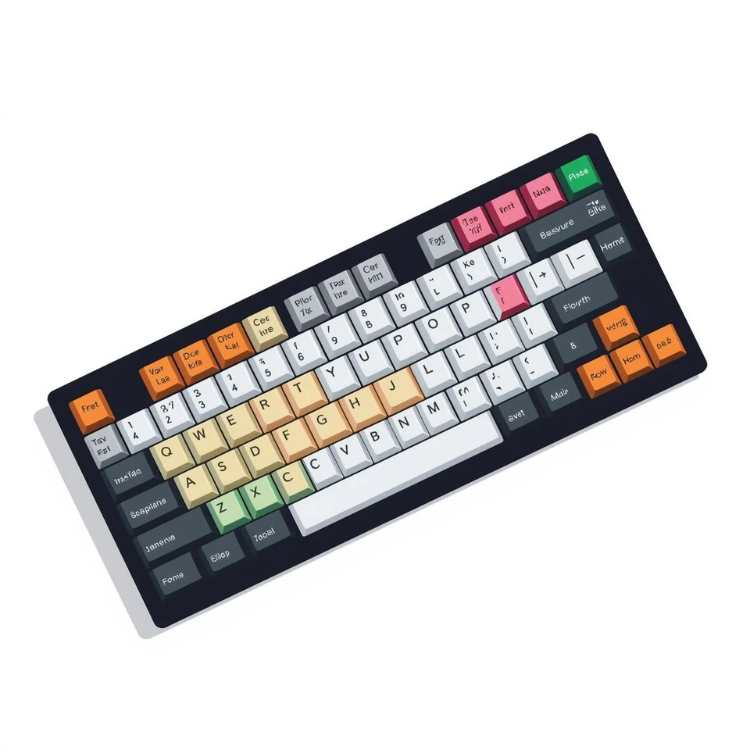
This is the foundation of typing. Your fingers must always rest on the middle row of the keyboard.
Left Hand: Little finger on A, Ring finger on S, Middle on D, Index on F.
Right Hand: Index on J, Middle on K, Ring on L, Little on ;.
Thumbs: Both thumbs rest on the Spacebar.
Notice the small “bumps” on the F and J keys? They are there so you can find the Home Row without looking!
Rule #3: Accuracy > Speed (The Golden Rule)
In exams like SSC, Accuracy is more important than Speed.
If you type 50 WPM but make 20 mistakes, you will be disqualified.
If you type 35 WPM with 0 mistakes, you will pass.
Strategy: When you start, forget about speed. Type slowly. Ensure you hit the right key. Speed is a byproduct of accuracy. Once your fingers stop making mistakes, speed will automatically increase.
Rule #4: Use the Right Keyboard
This is a pro tip that coaching centers won’t tell you.
Don’t practice on a Laptop: Laptop keys are flat (Chiclet keys).
Practice on a USB Keyboard: In the exam center, you will get an old, bulky TVS Gold or Dell USB Keyboard with raised keys.
The Feel: The keys in the exam hall are often “hard” to press. If you only practice on a soft laptop keyboard, your fingers will pain during the actual exam. Buy a standard USB keyboard for ₹300 and practice on it.
Top 5 Free Tools to Practice Typing
You don’t need to join an expensive institute. Use these free tools:
Typing Master (Software): The best offline tool for learning Home Row basics. It has games like “Bubbles” which make learning fun.
10FastFingers.com: Great for quick 1-minute speed tests. It lets you compete with others globally.
Keybr.com: This website uses AI to find which keys you are weak at (e.g., if you struggle with ‘Z’ or ‘X’) and makes you practice those specifically.
Sony Typing Tutor: Very popular among SSC aspirants because its interface looks exactly like the real exam software.
Monkeytype: A minimalist, ad-free website for distraction-free practice.
How to Measure Your Progress? (WPM & CPM)
WPM (Words Per Minute): Standard measure. 5 characters count as 1 word.
CPM (Characters Per Minute): Some exams ask for Key Depressions (e.g., 8000 Key Depressions per hour).
Formula:
WPM = (Total Characters Typed / 5) / Time in Minutes.
7-Day Practice Routine for Beginners
Follow this schedule to see results:
Day 1-2: Memorize the Home Row (ASDF JKL;). Do not type words, just meaningless letters.
Day 3-4: Practice Top Row (QWERTY) and Bottom Row (ZXCVBN).
Day 5: Start typing simple 3-letter words (The, And, For, Are).
Day 6: Practice Capital letters using the Shift key.
Day 7: Take your first Paragraph Test.
Conclusion
Typing is a skill that stays with you for life. It saves you hours of time in college, at work, and helps you crack competitive exams.
Don’t wait for the exam date to release. Start practicing 30 minutes daily from today. Remember, your fingers have memory—train them well.
Keep visiting DlyJobs for more skill development tips and exam strategies.
Frequently Asked Questions
Q1: Is Backspace allowed in SSC Typing Exams? It depends on the specific notification. In recent SSC exams, the Backspace key is usually enabled, allowing you to correct mistakes. However, overusing it reduces your speed.
Q2: Should I learn English or Hindi typing? English typing is easier and has more job opportunities in the private sector. However, for some state-level jobs (like in UP or Bihar), Hindi typing (Mangal Font) is mandatory.
Q3: How much time does it take to reach 35 WPM? If you practice 1 hour daily with the correct technique (Touch Typing), you can reach 35 WPM in 20 to 25 days.
Q4: Should I trim my nails for typing? Yes! Long nails prevent your fingertips from hitting the keys properly and can cause slipping. Keep your nails short for the best speed.

Nasir
Expert content creator dedicated to providing authentic educational and career updates.